Excel Routing - AdvancedRouting - Advanced
Advanced Routing
This model provides access to more advanced features of Icepack’s vehicle routing solver model. Several worksheets need to be populated, unlike the other models in which all the input and output data is captured on a single worksheet. In addition to vehicle classes, the model also expects orders to be explicitly provided. This allows you to have multiple jobs scheduled for a location.
Input Worksheets
To start with, create a sample set of template worksheets. You can then run the example or enter your own data. The requirements for each worksheet are listed below and described in detail in subsequent sections.
- Location Data: Locations of all geographic points. IDs must be unique and the Profile must match a Location Profile
- Location Profiles: Specify fixed visit times and location time intervals in minutes.
- Vehicle Classes: Class Names must be unique and Speed Factors affect travel time calculations relative to the underlying network speed.
- Vehicles Per Depot: Specify how many of each class of vehicle are located at depot locations.
- Order Data: Each order that must be delivered or picked up.
Locations and Profiles
To specify the requirements of a location, you need to enter location data and assign it to a valid location profile.
Worksheet name: IVR7-Location Data
For each location the following is required:
- ID: A unique ID as a string or number.
- Profile: A valid profile ID that is defined in Location Profiles.
- Longitude: The location’s longitude in decimal degrees.
- Latitude: The location’s latitude in decimal degrees.
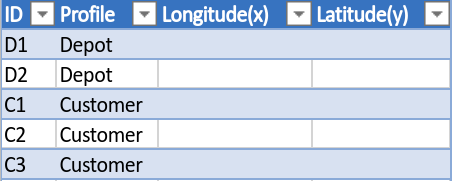
A location example with two Depot profiles and the others as customers. How profiles are named and associated with locations is entirely up to you. In this example, we have used Depot and Customer as a way to easily tell what type of location this is, but this can just as easily be done with naming convention of the location or through some other means.
Worksheet name: IVR7-Location Profiles
Location profiles provide window and time constraint information which is often shared by multiple locations.
For each location profile the following is required:
- Profile: A unique ID as a string or number.
- Fixed Visit Time: Time spent at location irrespective of job size.
- Window Start: The start of the time window at which the location can be visited in minutes.
- Window End: The end of the time window at which the location can be visited in minutes.

An example of two different profiles to which locations can be associated.
Vehicles
Vehicles belong to vehicle classes and the number of vehicles with a particular class is then assigned to a location.
Worksheet name: IVR7-Vehicle Classes
For each vehicle class the following is required:
- ClassID: A unique class name as a string or number.
- #Vehicles: Number of vehicles of that class.
- Capacity: A positive number that represents the total accumulated job capacity that a vehicle can hold.
- Cost/km: Unit cost per kilometer travelled.
- Cost/day: Unit cost of using the vehicle regardless of distance, time or capacity moved.
- Cost/hour: Unit cost per hour a vehicle is in use with respect to the start and end of its schedule.
- Speed Factor: Adjust the road network speeds by this factor. Typical range would be between 0 and 2.
- Start: Vehicle Shift start time.
- End: Vehicle Shift end time.
- Allowed Lateness: The maximum lateness in minutes allowed on the vehicle shift times.
- Lateness Penalty: The cost per unit lateness incurred if lateness is required.

An example of different vehicle classes.
Worksheet name: IVR7-Vehicles Per Depot
The number of vehicles per depot location are specified on this worksheet. The following is required:
- Vehicle Class: A valid vehicle class ID as defined on the Vehicle Classes worksheet.
- Depot Location ID: A valid location ID as defined on the Location worksheet.
- Fleet Size: The number of vehicles allocated to that location.
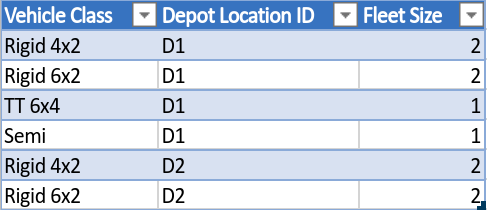
An example of vehicle class assignments to locations. In total, 6 vehicles are assigned to location D1 and 4 to D2.
Orders
The movements of all jobs that need to be scheduled is specified by creating orders. The following is required:
- ID: A unique order ID as a string or number.
- From ID: A valid location ID from which the order originates.
- To ID: A valid location ID which specifies the order destination.
- Quantity: The order quantity which should be specified in the same units as vehicle capacity.
The following fields are optional:
- Window Start: The start of the time window at which the location can be visited.
- Window End: The end of the time window at which the location can be visited.
- FirstonTrip: Whether the order must be the first to be delivered. TRUE or FALSE.
- LastonTrip: Whether the order must be the last to be delivered. TRUE or FALSE.
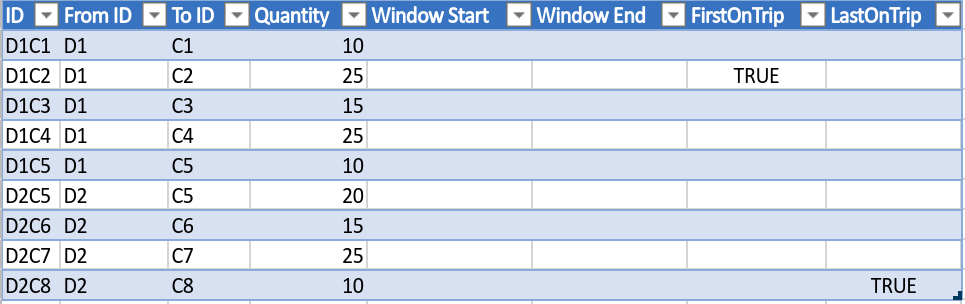
An example of orders to be scheduled. 5 originating from Depot D1 and 4 from Depot D2 and each order destined for a different customer.
Result Worksheets
The solution output of the problem will be written to the following worksheet: IVR7-Location Data. The format follows that of the CVRPTW solution output provided here.
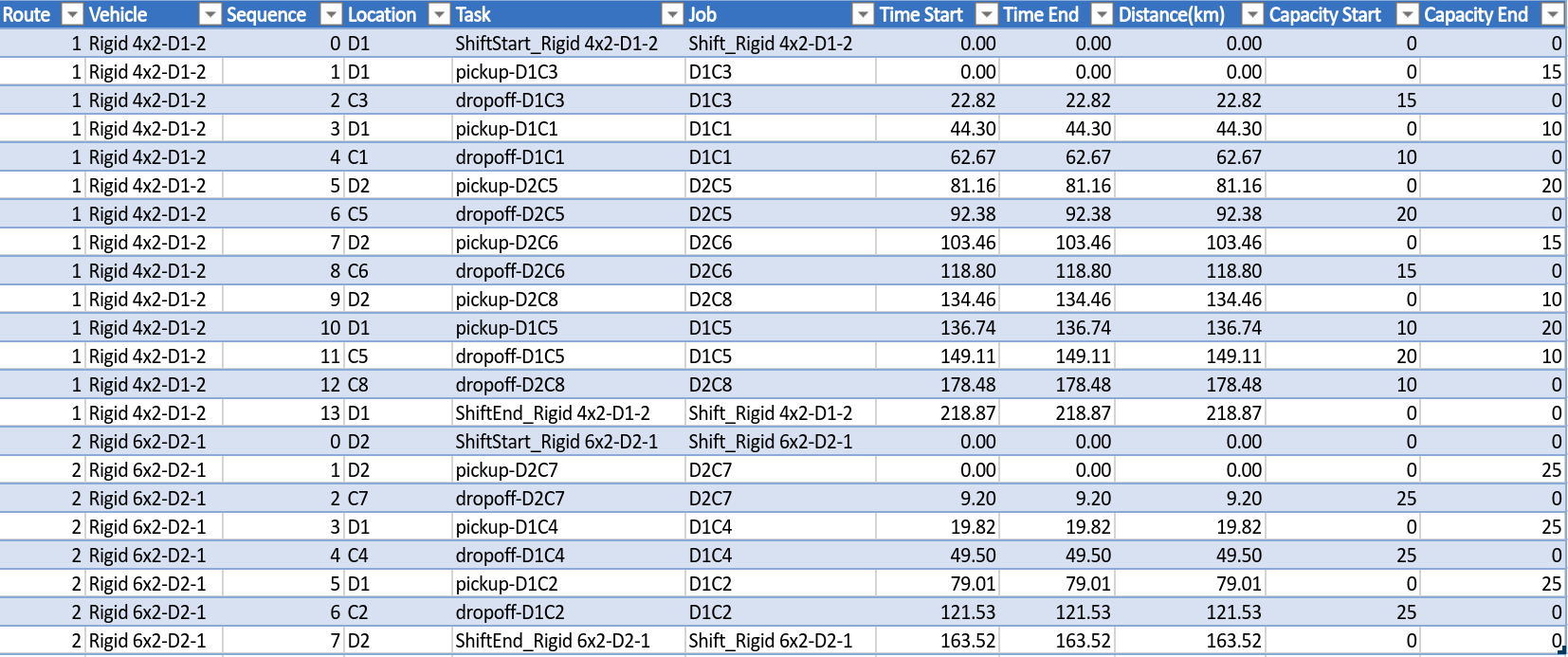
An example schedule of the orders as described above. Note that vehicles are not restricted from picking up loads from a location they do not start from. In this case the Rigid 4x2 picks up loads from both D1 and D2, and similarly for the Rigid 6x4 from D2.