Excel Routing - CVRPRouting - CVRP
The Excel Interface currently supports 2 varients of the CVRP:
- CVRP - Capacitated Vehicle Routing Problem
Single depot, single demand per location, one capacitated vehicle type
- CVRPTW - CVRP with Time Windows
Single depot, single demand and time windows per location, multiple capacitated vehicle classes, and load and off-load times / unit capacity
Capacitated VRP
The Capictated Vehicle Routing Problem introduces the concept of vehicle capacities and location demand to the standard TSP. Given a demand at each loaction, a set of vehicles with a capacity value and a common starting location for the vehicles, what are the routes that satisify the demand at each node, minimising distance travelled by all the vehicles used? See the CVRP Model section for more details.
The CVRP model reads and writes data to a worksheet named CVRP Data
CVRP Data Requirements
First, select a Template option from the dropdown and then click on Create CVRP Template. This will create a new CVRP Data worksheet or replace an existing one.
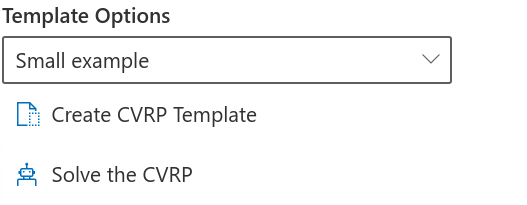
The small example template will populate the spreadsheet with 6 sample locations as an example of how information should be entered. A blank template will only populate the headings of each column.
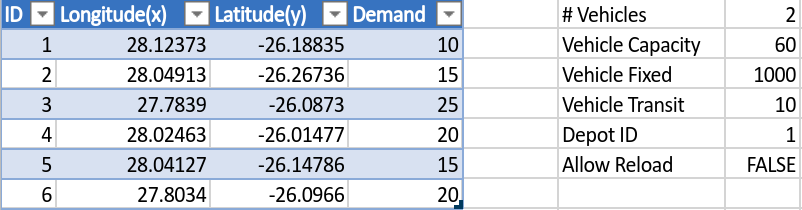
Example of small input template fields. There are 6 locations with demand ranging from 10 to 25 per stop. Maximum of 2 vehicles, each with a capacity of 60. A fixed cost of 1000 is incurred for using a vehicle and a cost of 10/km for travel. The depot is location 1 and no reloading is allowed.
For each location the following is required
- ID: A unique ID as a string or number.
- Longitude: The location’s longitude in decimal degree format.
- Latitude: The location’s latitude in decimal degree format.
- Demand: A positive quantity representing the demand at the node. The units that are used, e.g. kg, must be matched by the vehicle capacity.
In addition to locations, the number of vehicles and costs per vehicle can be specified.
- #Vehicles: The maximum number of vehicles that can be used. Postive integer.
- Vehicle Capacity: The capicty of a single vehicle specified in the same units as the location demand values. Positive value.
- Vehicle Fixed: Fixed cost for using a vehicle. Postive value.
- Vehicle Transit: Cost of vehicle per km travelled, specified as cost / km. Positve value.
- Depot ID: The location ID from which the vehicles start and end. Note that any demand associated with the depot is ignored.
- Allow Reload: Allow a vehicle to reload at the depot. TRUE or FALSE.
CVRP Solution
Once the problem has been solved, the results will be written to the CVRP Data spreadsheet.
Objective and Infeasibilites
-
The objective is a cost function that the solver attempts to minimise given the input values. This is useful when comparing different runs with each other. In the case of the CVRP model the objective is simply
Objective = #Vehicles * Cost/Vehicle + Total Distance * Cost/km + #Dropped Jobs * Penalty
-
When the solver cannot find a solution, the number of constraints that have been broken are provided in an infeasibility table. This can help determine how to work out what might be wrong with the model configuration or lead you to the realisation that sometimes you just cannot have what you really, really want.
CVRP solution output table
The solution output table has a row for each task that must be completed and the sequence in which it must be done. These columns are as follows:
- Route: The route that a set of tasks belongs to. A route is a single sequence starting and ending at the depot location.
- Vehicle: A vehicle indicator given by v1, v2, etc. for each vehicle required up to the maximum number of vehicles allowed.
- Sequence: The order in which the task takes place within the route.
- Location: The location ID at which the task takes place.
- Task: There are 3 types of tasks that can occur:
- ShiftStart and ShiftEnd are the initial start and end of the vehicle’s location and capacity.
- pickup - Allocated job to a vehicle reducing its capacity by the size of the load.
- dropoff - Completion of a job at a given location increasing vehicle capacity by the load.
- Job: Indicates which job the task is part of.
- Distance: Cummulative distance in km travelled by the vehicle at the point that the task is done.
- Capacity Start: The cummulative vehicle capacity used at the start of the task.
- Capacity End: The cummulative vehicle capacity used at the end of the task.
Using the input in the table above as an example, let’s look at the effects of allowing reloading.
Allow Reloading = True objective = 2613 and total distance = 162km.
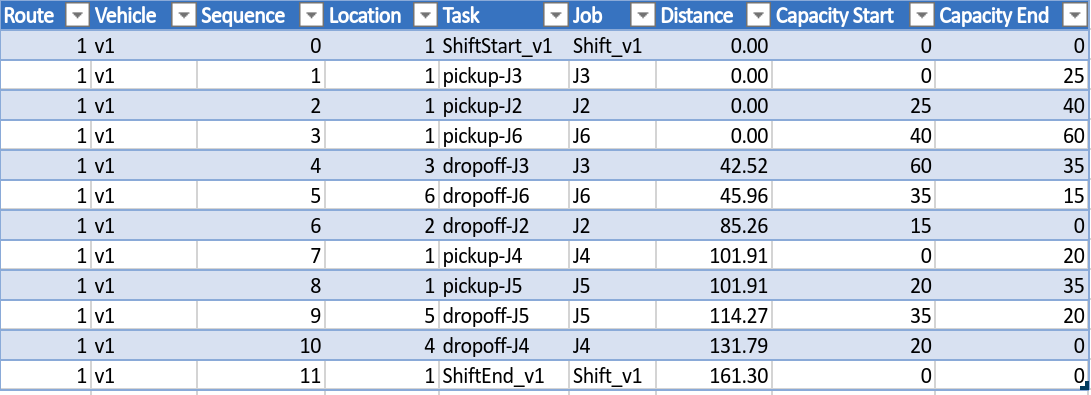
The solution has the following properties:
- Firstly, there is 1 route. Only one vehicle is required as it can reload as many times as necessary.
- Vehicle 1 travels 102km from the depot and back, completing the jobs J3, J6, J2.
- Vehicle 1 then reloads and travels a further 60km, completing jobs J5 and J4.
Allow Reloading = False objective = 3613 and total distance = 162km.
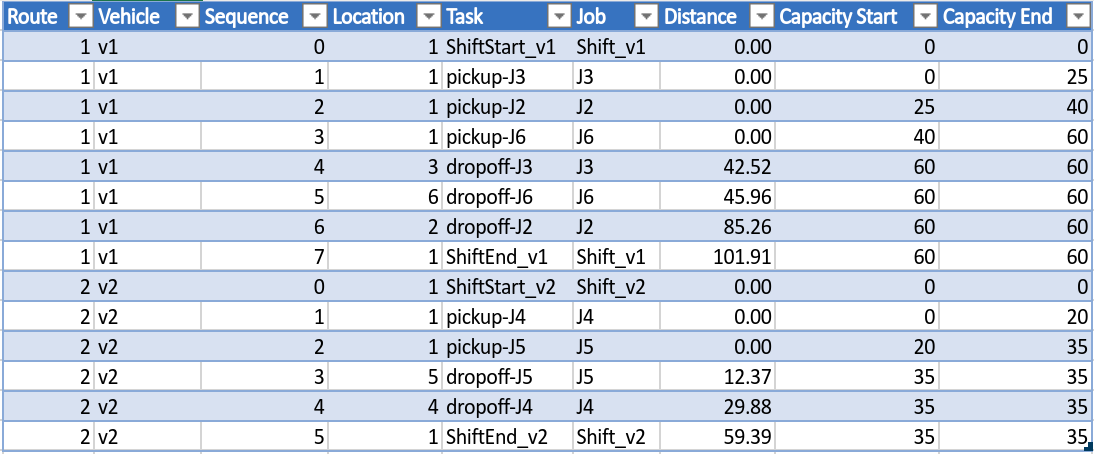
The solution has the following properties:
- Firstly, there are 2 routes which means two vehicles are required as we don’t allow reloads.
- Vehicle 1 travels 102km and vehicle 2 60km, for a total trip length of 162km.
- Vehicle 1 does 3 jobs in the sequence J3, J6, J2.
- Vehicle 2 does 2 jobs in the sequence J5, J4.
CVRP Infeasibilities
Infeasibilities arise when the solver cannot find a solution which does not break any constraints specified in the input. In the case of the CVRP model, the only constraint that can be broken is capacity. Based on the examples above, if we decrease the capacity of the vehicles to 20, then the job at location 3 cannot be scheduled.
In cases like this, the solver will drop these jobs and schedule what it can as shown below.
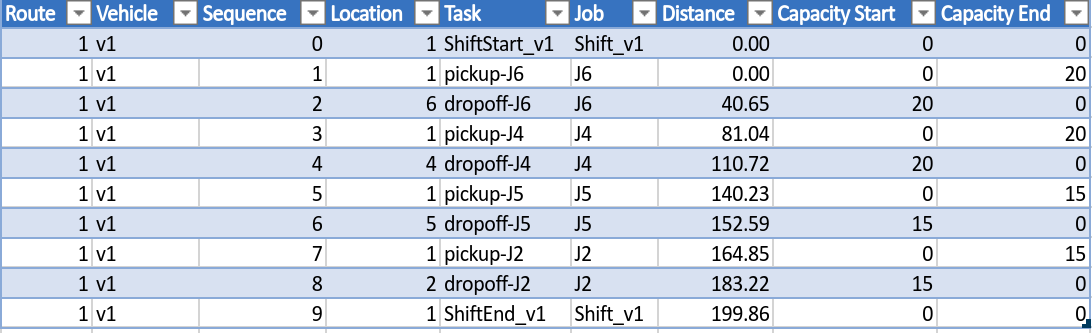
Partially solved solution with Job 3 being dropped as it exceeds the vehicle capacity, this also adds an additional penalty cost of 1 000 000 to the objective.
The objective = 1002998 and the number of infeasibilites = 2. When infeasibilites are present, an additional table is provided with further details:

Infeasibilities - The 2 tasks associated with Job 3 cannot be performed without breaking the vehicles capacity constraint.
- Task ID: The task associated with the constraint that prevents it from being included.
- Message: A message indicating what type of constraint is being broken.
- DimID: The dimension ID that is involved. For the CVRP the only Dimensions are Distance and Capacity.
- Count: The number of times the constraint was broken when searching for a solution.
- Limit: The limit value of the dimension.
- Value: The average value of the constraint across solve attempts that is preventing the task from being included.
In this case, we can see that Job 3 has a capacity issue. Looking back at input data it is clear that the demand at location 3 cannot be serviced with vehicles of capacity 20 as indicated by the limit value. In general, however, as problems become larger, it may not be clear what tasks are contributing to possible infeasibilities in which case this table can help you narrow in on where the issues may lie.
CVRPTW
The CVRPTW interface includes several additional features. Locations can now have demand and allowable visit time windows. More than one class of vehicle can be specified each with their own cost, capacity and shift times. Load and Offload times can also be specified per unit that is picked up or delivered, respectively. See the CVRP Model section for more details.
The model reads and writes data to a worksheet named CVRP-TW Data
CVRP Data Requirements
As with the CVRP interface, first select a Template option from the dropdown and then click on Create CVRPTW Template. This will create a new CVRPTW Data worksheet or replace an existing one.
The small example template will populate the spreadsheet with 10 sample locations as an example of how information should be entered. A blank template will only populate the headings of each column.
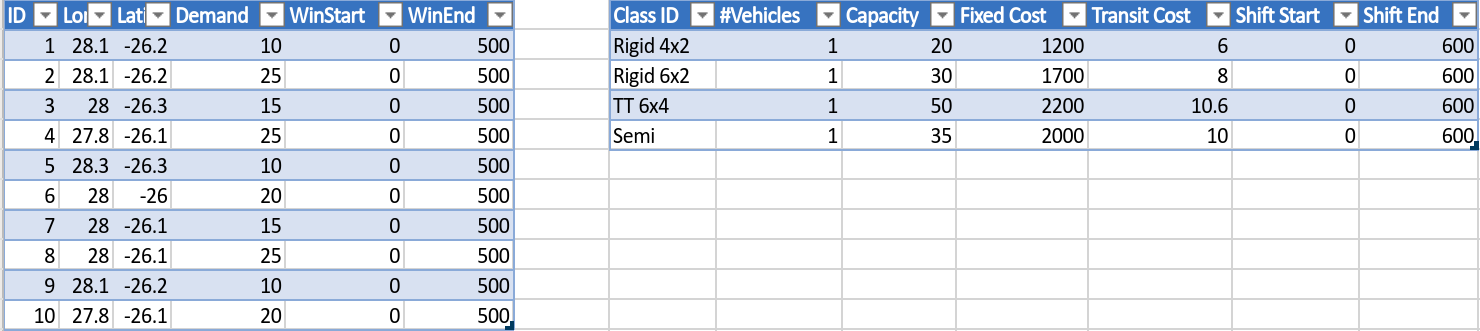
Input tables for the CVRPTW model. Location information is entered into the left table and vehicle class data into the right table.
Location Data
For each location the following is required:
- ID: A unique ID as a string or number.
- Longitude: The location’s longitude in decimal degrees.
- Latitude: The location’s latitude in decimal degrees.
- Demand: A positive quantity representing the demand at the node. The units that are used, e.g. kg, must be matched by the vehicle capacity.
- WinStart: The start of the time window at which the location can be visited.
- WinEnd: The end of the time window at which the location can be visited.
Vehicle Data
One or more vehicle classes can be specified as follows:
- ClassID: A unique class name.
- #Vehicles: Number of vehicles of that class.
- Capacity: A postive number that represents the total capacity that a vehicle can hold.
- Fixed Cost: Fixed cost for using a vehicle in the schedule >= 0.
- Transit Cost: Vehicle travel cost, specified as a cost / km >= 0.
- Shift Start: Vehicle availability time window start in minutes.
- Shift End: Vehicle availability time window end in minutes.
Additional Data
The following information is requried in addition to filling in the location and vehicle class tables.
- Depot ID: A valid location ID from which the vehicles start and end. Note that any demand associated with the depot is ignored.
- Allow Reload: Allow a vehicle to reload at the depot, TRUE or FALSE.
- Load Time: Time to load a given capacity, minutes / capacity unit.
- OffloadTime: Time to offload a given capacity, minutes / capacity unit.
CVRPTW Solution
Once the problem has been solved, the results will be written to the CVRP-TW Data spreadsheet.
Objective and Infeasibilites
-
The objective is a cost function that the solver attempts to minimise given the input values. This is useful when comparing different runs with each other. In the case of the CVRP model the objective is simply
-
When the solver cannot find a solution, the number of constraints that have been broken are provided in an infeasibility table. This can help determine how to work out what might be wrong with the model configuration or lead you to the realisation that sometimes you just cannot have what you really, really want.
CVRPTW solution output table
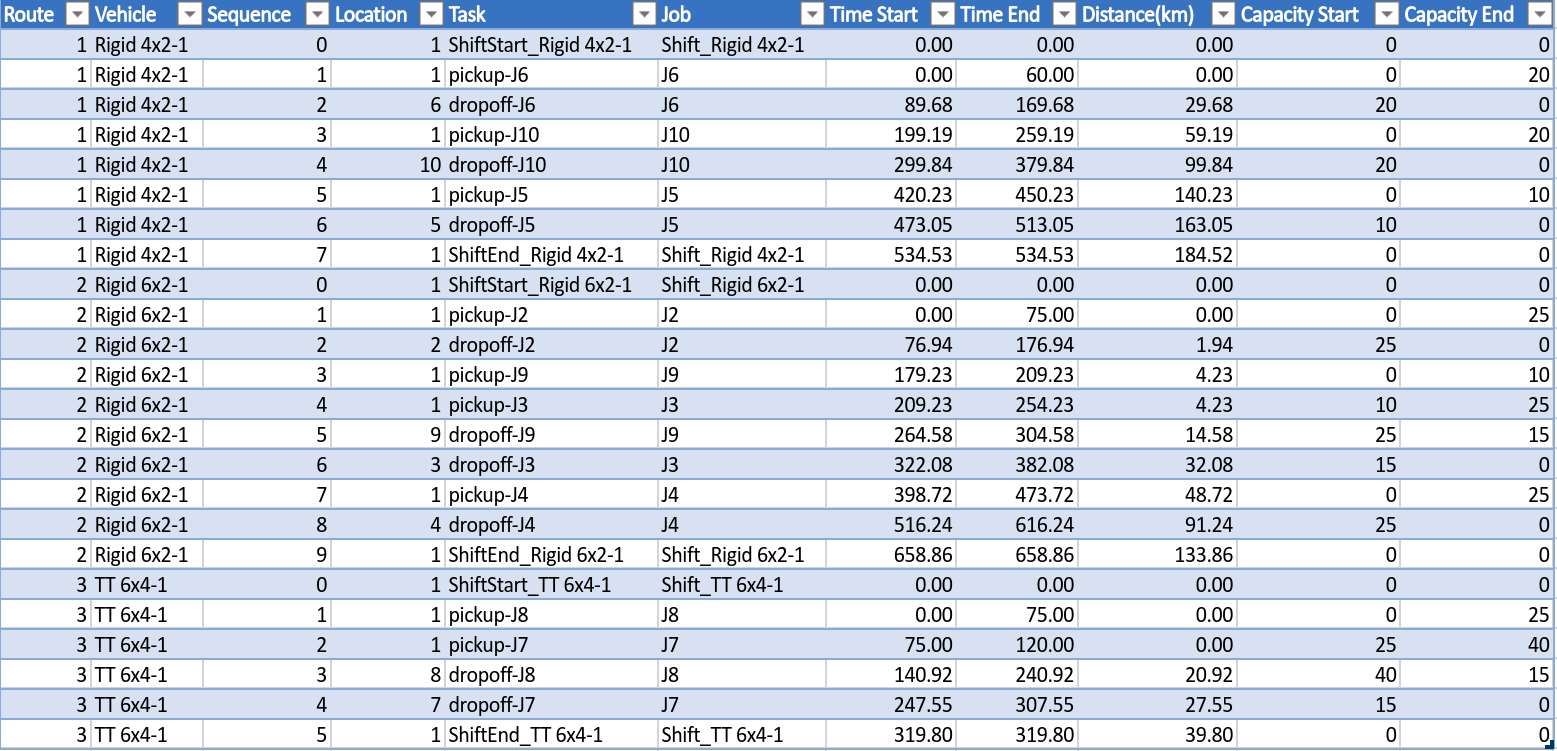
The solution output table has a row for each task that must tbe completed and the sequence in which it must be done. These columns are the same as for the CVRP output as explained here.
There are two additional columns which indicate the start and end time for each task: Time Start and Time End.
.
Using the input in the table above as an example, let’s look at the effects of Allowing Reloading.
Allow Reloading = True objective = 7599 and total distance = 331km.
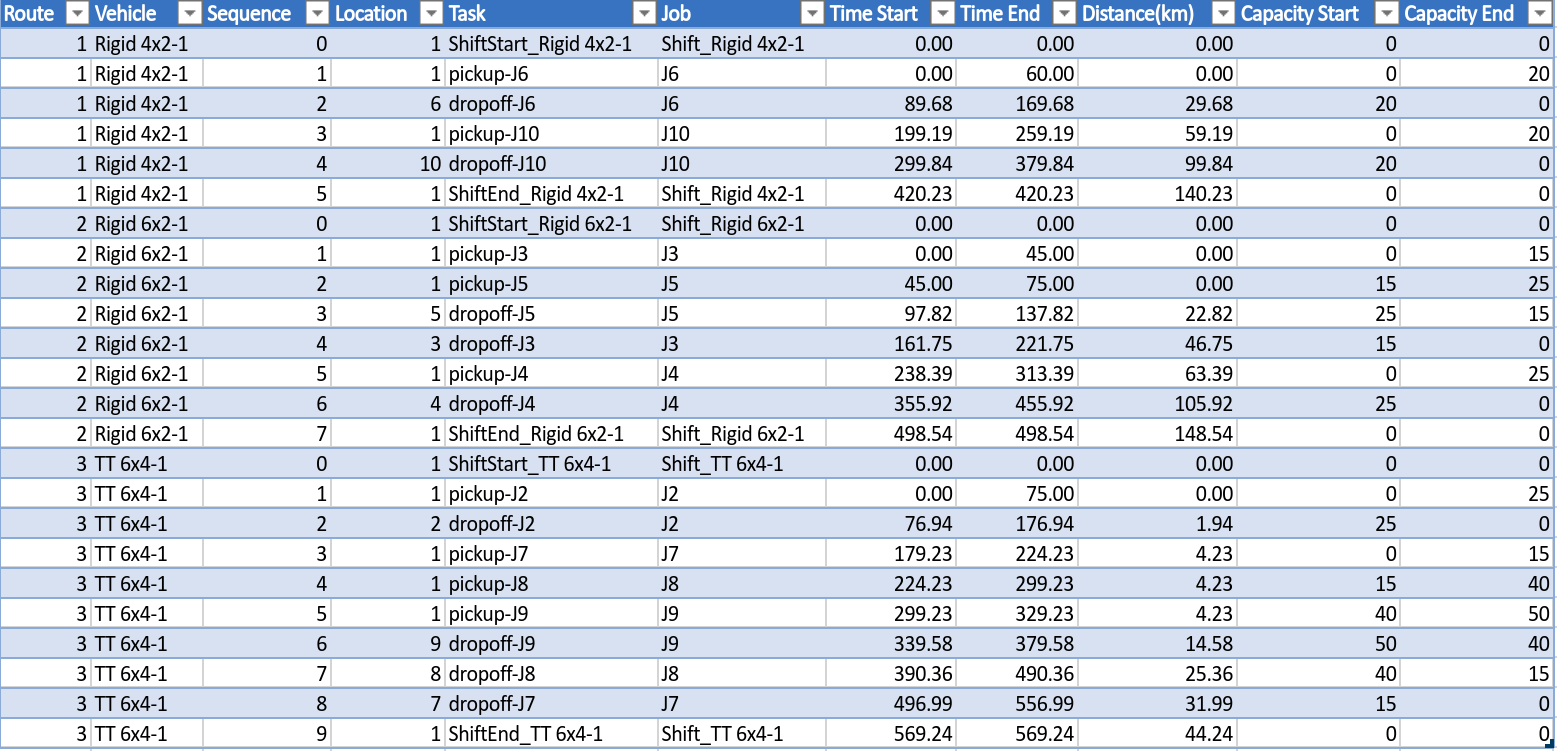
The solution has the following properties:
- 3 of the 4 vehicles are used: 1 Rigid 4x2, 1 Rigid 6x2 and 1 TT 6x4 as given by the Class IDs in the input.
- There is enough time within the vehicle shifts, depot and visit times for reloading to be feasible.
- The Rigid 4x2 sequence is Depot - J6 - Depot - J10 - Depot.
- The Rigid 4x6 sequence is Depot - J5 - J3 - Depot - J4 - Depot.
- The TT 6x4 sequence is Depot - J2 - Depot - J9 - J8 - J7 - Depot.
- All vehicles arrive at their job locations prior to the 500 minute deadline.
- All vehicles finish their shifts before the 600 minute deadline.
- Start and End times at pickup and dropoffs are not identical as the loading and offloading times make a difference.
CVRPTW Infeasibilities
Unlike the CVRP model, infeasibilities for the CVRPTW can arise through both capacity and time window constraints. As we have already explained how an infeasibile capacity constraint can arise, in this example we will look at a time window infeasibility. Let’s make the following changes to the model data:
- Assume that we wish to only use the three vehicles as per the original schedule generated above, so we will set the #Vehicles for the Semi class to 0.
- Next, let’s say we want the TT 6x4 vehicle to return early for maintinance. We decrease the Shift End to 400 minutes and this results in the TT 6x4 vehicle performing only 2 jobs, J6 and J8, but arriving back at 380.
- Our maintance crew request another hour of time, so we reduce it further to 340 minutes. This results in two infeasibilities for job 4. The infeasibility table is shown below. Looks like they are out of luck.
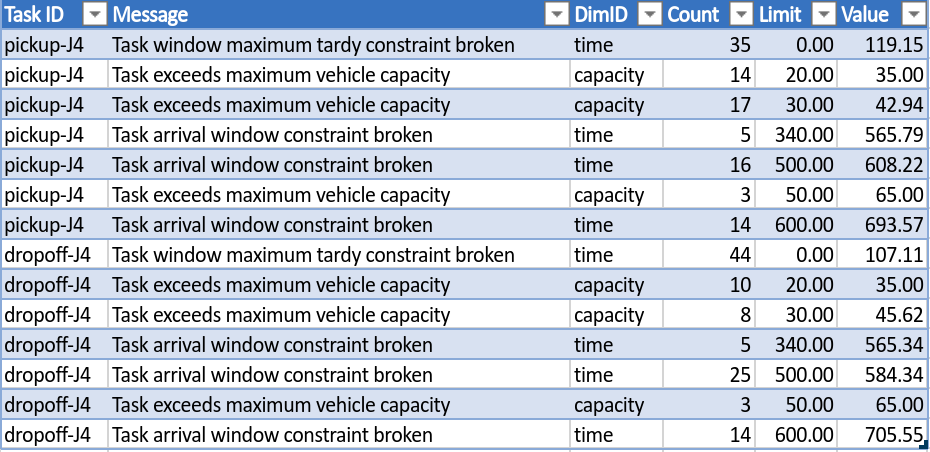
Partially solved solution with Job 4 being dropped.
The infeasibilites for each task give us some insight into various options we might take to still peform all the jobs as required.
- Firstly, all the capacity constraints are broken in the search for a feasible solution at some point. The vehicle does not have enough capacity: the Rigid 4x2 can only accomodate 20 and Job4 is 25. The other vehicles also suffer from a lack of capacity as more jobs are required to fit on them in order to fit into the time allowed.
- The current CVRPTW does not allow jobs to be delivered late, hence the Task window maximum tardy constraint limit of 0 minutes. It looks like if we could ease this condition we would be ok, but that is off the table.
- Lastly, the arrival windows and the two vehicle shift times are broken as well. If we extend the permissible time window for location 4 and the shift time of the Rigid 4x2 by 60 minutes, we can once again find a feasible solution, assuming customer 4 is not too unhappy and our driver overhour cost (not modeled in the CVRPTW interface) does not exceed our dropped job penalty.
The resulting schedule has the vehicle returning almost an hour later than previously and the delivery for job 4 16 minutes after the normal close.
Recovering from our dropped job at location 4.
By working through the infeasibilty information, the necessary adjustments can be made to try and resolve the problem. Note that we could have simply opened up all the windows across jobs and vehicles and seen what happened. This is just one example of how you can test different options quickly and pick the one that suits you.